Stop Babysitting Your AI Agents: Build a Verification Loop
I stopped babysitting my AI agents by giving each one a verification loop and a clear definition of done. Here is how the loop works and how I build it.
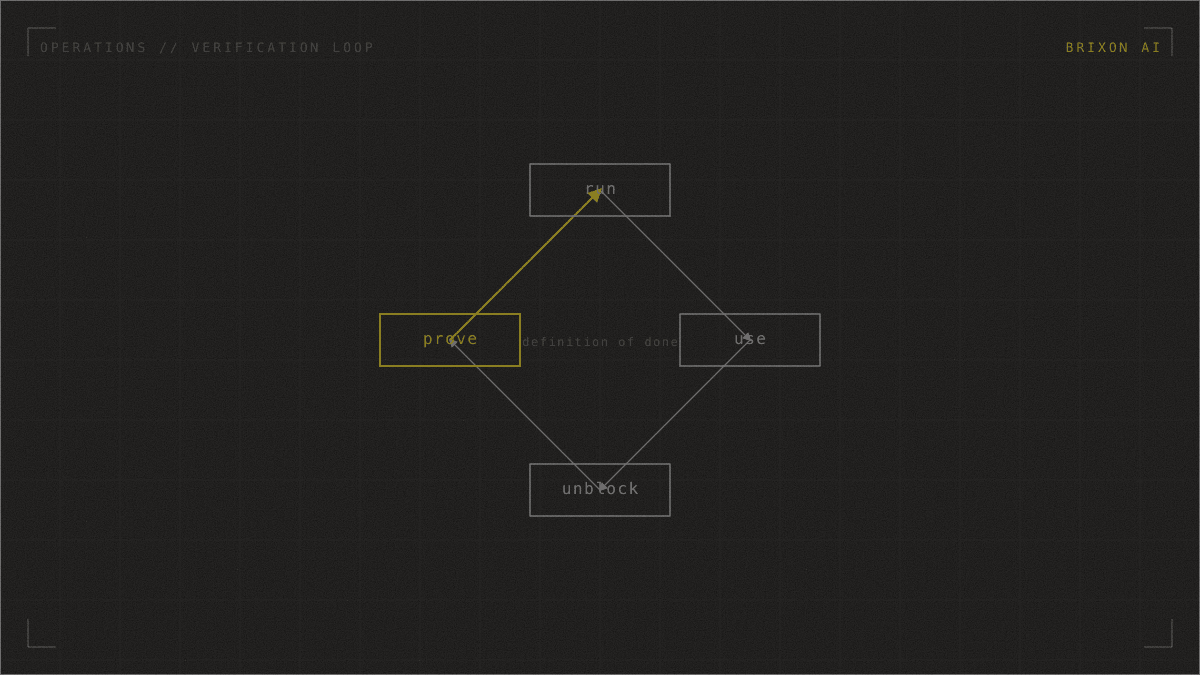
You stop babysitting an AI agent by giving it a verification loop: the tools to run and observe its own work, plus a clear definition of "done," so it self-corrects until it reaches that success state instead of handing you raw output to inspect. The loop is what moves you from QA tester to reviewer, and it is the precondition for safely running agents in parallel or in the background. Without a defined success check, there is no loop to build.
This frame comes from a talk by Sidd Bhundisaria, a founding engineer on Claude Code, titled "Stop babysitting your agents." Product features he names are his references as of that talk and are flagged below; the underlying method holds regardless of the tool. I run my own agency on this method, so I will use one worked example throughout: an intake agent at a 60-person firm, asked to fix a broken auto-reply, handled two ways.
Why do I spend so much time reviewing AI output?
Because the better the model gets, the more my day shifts from writing to watching. I type a request, wait, then read every line, click through every screen, and re-run the work by hand to confirm it is correct. The time AI saved on the writing comes back at the checking, and it gets worse with capability, not better: a stronger model produces more, faster, which gives me more to review.
The data backs up the feeling. In the 2025 Stack Overflow Developer Survey, more developers now distrust the accuracy of AI tools (46%) than trust it (33%), the biggest single frustration (cited by 66%) is AI output that is "almost right, but not quite," and 45% say debugging AI-generated code is more time-consuming than expected (Stack Overflow, 2025 Developer Survey). "Almost right, but not quite" is precisely the output that demands a human reviewer. The bottleneck moved: it is no longer the typing, it is you, the only thing in the system that can tell whether the work is done. As an engineer I find that unacceptable, and I cover the deeper failure mode in why AI agents are confidently wrong.
What is an AI agent verification loop?
A verification loop is a self-running circuit you set up once so the agent can complete it on its own: write, run, observe, fix, repeat, until it reaches a success state you defined. Give the agent two things, a way to do the work and a way to see whether the work worked, and it stops being a one-shot text generator. It starts to hill-climb: try, check, notice the failure, change approach, try again, until the result is actually right.
On the intake agent's first turn, told "make the auto-reply fire again," an agent inside a loop does not edit a file and declare victory. It starts the app, submits a test enquiry through the form like a real visitor, checks whether a reply actually went out, sees that it did not, reads the mail-service logs, fixes the misconfigured sender, submits another test enquiry, and confirms the reply lands. Only then does it stop. What reaches me is a change already shown to work. This is the same pattern Anthropic describes for effective agents: during execution the agent has to gain "'ground truth' from the environment at each step" and "iterate on solutions using test results as feedback" (Anthropic, Building Effective Agents).
Why does a verification loop beat just using a smarter model?
Because a model without a way to check its work is guessing in the dark, however clever the guess. A model with a way to check is doing something categorically different: it can tell the difference between "I wrote something" and "it works," and act on the gap. Capability matters, but the loop is what turns capability into a result you can trust.
That puts all the weight on one thing: the success criterion. The loop hill-climbs toward whatever you define as "done." Define it sharply, for example "an auto-reply is received within sixty seconds of a test enquiry and the enquiry appears in the CRM," and the agent has a real summit to climb to. Define it vaguely, or not at all, and it climbs to "looks fine," which is the unverified output you were trying to escape. The discipline underneath the whole method is blunt, and it is the same discipline I learned on a factory floor: inputs must lead to predictable outputs. No definition of done, no loop. If you cannot answer "how will it, and you, know it is done?" for a task, you cannot loop it yet, and that is the most useful thing the exercise tells you about your own process. Turning that success criterion into something you can run repeatedly is exactly the work I describe in building evals for AI agents.
How do you build a verification loop? Four moves
Building one turns out to be the same four moves almost every time. They are the difference between an agent that says it is done and one that shows it.
- Run it. Give the agent the command to bring the system to life: the dev server, the workflow, the container. An agent that cannot run your system can only reason about it from the outside.
- Use it like a real user. Reading the code is not using the product. The agent has to drive the real surface: open a browser and click through the form, call the API, submit the test enquiry. For anything with a screen, a browser-control tool is the move. [talk]
- Prove it. Capture the real side effect, before and after: a screenshot of the reply in the inbox, the log line that should appear, the database row that should now exist. Proof is what separates verification from optimism.
- Unblock it. Real systems do not let a stranger in, and two blockers stop nearly every loop on its first run.
The two blockers have names: auth and state. Auth means the agent needs a way to log in, a test account or token it is allowed to use; without it, the agent stares at a login wall and reports that "the page loaded," which is true and useless. State means a workflow needs realistic data to act on; you pre-seed it, because an empty CRM has no enquiry to triage. None of this is new, anyone who has written an integration test has written setup scripts for the same reasons. The shift is small: hand those scripts to the agent and let it generate them on the fly, so it can verify a far wider range of situations than any fixed script you would write by hand.
How do you make the loop reusable across a team?
A loop you built once dies with your terminal session unless you package it. Package it as a skill: portable, shareable context that says "here is how we verify this system" (bring up the stack, load the browser tool, run this smoke test, watch for these side effects). Now the loop is not a thing you did once; it is an asset anyone on the team can invoke, the same way every time. I go deeper on packaging reusable agent capability in what AI agent skills are.
Then make the skill improve itself. Write into it an instruction to update itself every time it hits a blocker, so the first time the loop trips over an undocumented login step, the agent records the fix and the next person never hits that wall. The skill becomes self-documenting, getting sturdier each time anyone uses it instead of rotting the way documentation usually does. A self-improving verification skill is the difference between one person who is good at making agents check themselves and a team that is, and it is the artifact that turns a personal knack into a durable shared practice. [talk]
When is it safe to run AI agents unattended?
Only once an agent can verify its own work. The sequence is load-bearing, not decoration: an agent you cannot trust to check itself is one you have to watch, watching is the bottleneck, so until the loop is real, "scale" just means more screens to stare at. With the loop in place, two things become safe that were reckless before.
First, you can run several agents at once. The constraint was never compute, it is attention; a handful of self-verifying agents is a team you supervise rather than a handful of things demanding your eyes. I cover delegating across a team you cannot watch every step of in my guide to running a team of AI agents and subagents. Second, you can let them run in the background. Much of what eats your week is bookkeeping, not building: chasing pull requests through CI, keeping docs current, triaging feedback. It needs to run in a loop; it does not need you in the loop. A scheduled prompt or a routine takes your keyboard out of the hot path.
This is now feasible because the underlying capability is real: independent measurement by METR finds the length of tasks AI can complete on its own has been doubling on a regular cadence (METR, 2025). But feasible is not the same as unsupervised. A human gate stays on anything that cannot be undone, such as deploying to production, deleting data, or sending to a customer. The discipline matters: Gartner projects that more than 40% of agentic AI projects will be canceled by the end of 2027, largely from cost and unclear value (Gartner, 2025). The projects that survive are the ones that can prove they work, which is exactly what a verification loop provides. I lay out the broader case for that proof in how to build trustworthy AI agents.
A worked example: the same fix, babysat and looped
Back to the intake agent and its broken auto-reply, same firm, same task, two ways of working.
Babysat, where you are the loop. You ask the agent to fix the auto-reply; it edits a config and says it is done. You do not trust "done," so you open the site, submit a test enquiry, switch to your inbox, see nothing arrive, copy the error from the logs, and paste it back. It tries again. You test again. Three or four rounds later it works. The agent did the typing; you ran every verification. The loop existed, it just ran through you.
Looped, where it checks itself. You ask the same thing, but the agent has a verification skill for this system. It brings up the app, submits its own test enquiry, checks the mail log, sees no reply fired, fixes the sender, submits another enquiry, confirms the reply lands and the CRM row appears, then opens a pull request that already carries the before-and-after evidence. You read the PR and merge. You verified once, at the end, instead of four times in the middle. Same model, same task; the difference is who runs the verification.
This is the difference between an AI subscription you operate yourself and an AI employee that gets the job done. A chatbot waits for your prompt and hands you raw output; an AI employee carries the loop and hands you a verified result. That is also why the loop matters for capacity: it is how I get more done without watching more screens, which is the trap I describe in the AI productivity paradox.
Frequently asked questions
What does it mean to stop babysitting an AI agent?
It means moving from manually checking everything the agent produces to giving the agent a verification loop so it checks its own work against a defined success state. You change from QA tester to reviewer: you approve finished, verified results instead of running the tests yourself in the middle of every task.
What is an AI agent verification loop?
A verification loop is a self-running circuit (write, run, observe, fix, repeat) that an agent completes on its own until it reaches a success state you defined. It requires two things: tools to run and observe the work, such as a browser or test runner, and a clear, checkable definition of "done."
How do you build a verification loop for an AI agent?
Four moves: run the application, use it like a real user (drive the browser or call the API), prove the result with before-and-after evidence (a screenshot, a log line, a database row), and unblock the agent past authentication and seeded state. Then package the working loop as a reusable skill.
Is it safe to run AI agents unattended?
Only once an agent can verify its own work, and only with a human gate on irreversible actions. Self-verifying agents can safely run in parallel or on a schedule, but anything that cannot be undone, such as deploying to production or deleting data, should still stop for human approval. I do not recommend running agents with no human gate at all.
Why use a smarter model instead of building a verification loop?
A smarter model without a way to check its work is still guessing; it produces more output, which means more for you to review. A verification loop lets the model tell whether its work actually succeeded and self-correct, turning raw capability into a result you can trust. The loop, not the model alone, is what removes you from the review bottleneck.
Sources and further reading
- Stack Overflow, 2025 Developer Survey: AI: developer trust in AI accuracy, "almost right but not quite," and time spent debugging AI-generated code.
- Anthropic, Building Effective Agents: agents gaining ground truth from the environment and iterating against test results.
- METR, Measuring AI Ability to Complete Long Tasks (2025): the doubling trend in the length of tasks AI can complete on its own.
- Gartner, 2025: projected cancellation rate for agentic AI projects by 2027.
The pattern behind all of this, deterministic checks for action and AI for judgment with a human gate where it counts, is how I build at Brixon AI, and I have run it on my own stack since early 2026: my agents carry verification skills, and a workflow does not run unattended until it can answer one question, can it tell whether it is done? You don't need another AI subscription; you need AI that works. If you want to put a task on a verified loop instead of watching it, see how managed AI employees work or talk to me about which task to put on a loop first.
Christoph Sauerborn is the founder of Brixon AI. He installs the shared AI infrastructure that agency teams work from. RWTH Aachen and Bosch Industry 4.0 background. More about how I work.