What an AI Employee Actually Is (And Why It Isn't a Chatbot)
I build AI employees for a living. Here is the real difference between one that does a task and a chatbot you operate yourself.
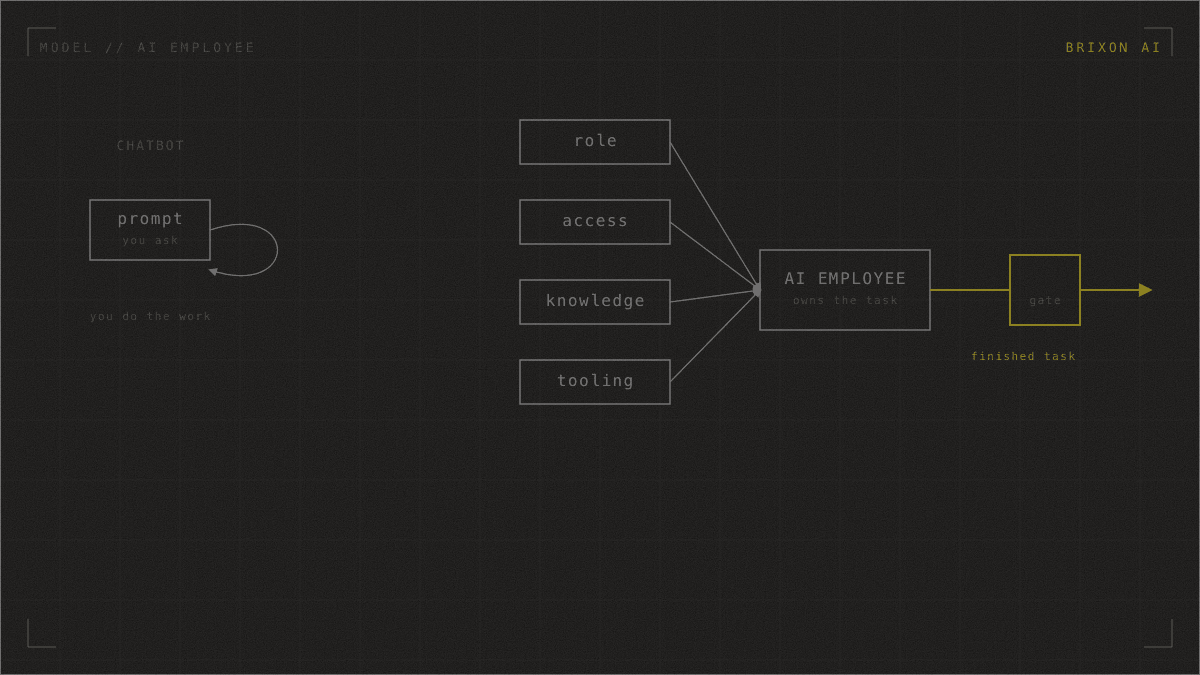
An AI employee is an AI system you give a defined role, access to your tools, knowledge of your business, and the tooling to act, so it takes a real task off your plate and does it where you already work instead of waiting for you to prompt it. That is the whole distinction from a chatbot: a chatbot is something you operate, turn by turn, doing the work yourself while the model answers. An AI employee owns an outcome. The difference is not a smarter model. It is whether the thing was given a job, the access to do it, and a way to be checked.
I'm a mechanical engineer by training, and I spent years in factory automation before I built AI systems. On a factory floor, you don't ask whether a machine is clever. You ask whether a known input produces a predictable output, reliably, every time. That is the lens I bring to this. The rest of this article explains what an AI employee actually is, why "AI agent vs chatbot" is the wrong frame for most buyers, and the method I use to build them: ROLE → DEPLOY → LEAD → SCALE.
What is the difference between an AI employee and a chatbot?
A chatbot waits for your prompt; an AI employee gets the job done. With a chatbot you are still the one doing the work. You frame the question, paste in the context, read the answer, decide what to do, and do it. The model is a clever assistant inside a box you have to operate. An AI employee is given the task itself: "own the first-draft renewal brief for every account," not "answer questions about renewals when I ask."
Put it in operational terms. A chatbot is a tool you carry into the work. An AI employee is given a role, plugged into the systems where the work lives, and held to a standard, the same things you'd give a new hire. The test is simple: after setup, does it still need you for every step, or does it produce finished work you only have to approve? The former is a subscription to a chatbot. The latter is an AI employee.
This is why I tell people: you don't need another AI subscription. You need AI that works. A subscription gives you a faster way to do the work yourself. An AI employee removes the work.
What does an AI employee actually need to do a job?
An AI employee needs the same four things a competent new colleague needs on day one: a clear role, access to where the work happens, knowledge of your business, and feedback loops that catch a mistake before it ships. Miss any one and the output degrades in a predictable way.
- Role. A defined task it owns end to end, with a clear definition of "done" and an explicit scope of what it must never touch.
- Access. The ability to reach where the work and the decisions live: your team chat, your CRM and dashboards, your docs, the history of how an account got here. This is where the why hides, and it's usually nowhere in the one document a chatbot gets pointed at.
- Knowledge. What's true about your business and nowhere in a general model: your internal names for things, your conventions, what changed last week. You feed this in on demand; you don't train it in.
- Tooling. Lightweight checks that run automatically after it acts and feed back a nudge, like the red underline under a misspelled word. A flag when a draft cites a discontinued product, plus a human gate on anything that acts in the real world.
This is where most failed AI projects actually break, long before model quality enters the picture. Gartner predicts that over 40% of agentic AI projects will be canceled by the end of 2027, citing escalating costs, unclear business value, and inadequate risk controls (Gartner, June 2025). Much of that is not a model problem. It's a capable system pointed at too little of the business. The model has the power; what it lacks is the connection.
Why won't a smarter model turn a chatbot into an AI employee?
Because the gap is connection and role, and a bigger model closes neither. When you do knowledge work yourself, you draw on far more than the document in front of you: a conversation from last week, a dashboard you glance at, a product change you remember because you were there. A chatbot reading a single source is reasoning correctly over far too little. That's a missing-input failure, and a bigger model does not repair missing inputs.
You can see this in the research. Fine-tuning a model on new factual knowledge it didn't learn in pre-training can actually increase its tendency to hallucinate (Gekhman et al., EMNLP 2024). So "train the model on our data" is usually the wrong instinct for facts that move week to week. The reliable move is to feed the right knowledge in at the moment it's needed, and to wire up access and checks. The model is rarely the bottleneck.
The stakes are higher than they were because these systems now act for longer on their own. METR found in 2025 that the length of tasks AI agents can complete unattended, at 50% reliability, has been doubling roughly every seven months, with frontier models reaching a time horizon of around 110 minutes (METR, 2025). An AI employee working off the wrong context does an hour of confident damage before anyone looks. That's why the role, the access, and the gate aren't optional extras.
How do you build an AI employee? The ROLE → DEPLOY → LEAD → SCALE method
I build every AI employee the same way, in four stages, in this order. Skipping a stage is how you end up in that canceled-project statistic.
- ROLE. Decide which task the AI employee should own. The question is not "where can we use AI," it's "which specific job, with what definition of done, and what it must never touch." This stage is a diagnosis. I'd rather tell a client one task is a bad fit than build something that fails quietly.
- DEPLOY. Build it and put it where the work already happens: Slack, Teams, Outlook. AI belongs in your process, not in another tool. If your team has to log into yet another dashboard to use it, you've built a chatbot with extra steps.
- LEAD. Govern quality and compliance the way you'd manage a junior hire. Define the checks, keep a human on the gate for anything consequential, and make the system's state visible so you can see what it actually did. For regulated service firms this is where GDPR / GoBD-compliant by construction matters: the discipline is built in, never bolted on.
- SCALE. Once one role is trustworthy, add capacity without new headcount: capacity at the hiring ceiling, without finding, financing, and onboarding new people. Scale without hiring.
The stages people skip are the bookends. They rush ROLE (and build the wrong thing) and skip LEAD (and can't trust the output). The middle, building and deploying, is the easy part; the judgment lives at the ends. For the mechanics of how a role gets packaged for an agent, see AI agent skills, and how multiple roles coordinate in AI agent teams and subagents.
What does a real AI employee look like? A worked example.
Take a concrete role: an AI employee that drafts the quarterly renewal brief for every customer account. The model stays the same throughout. I change only what it can reach, know, and be checked by.
- As a chatbot. You paste in the CRM record and ask for a renewal brief. It writes a glowing one for "Acme" at the current tier. The draft is fluent and confident and completely wrong, because last week the team spent two days in a chat thread about Acme threatening to leave, and the support dashboard is a wall of red. You fed it context and it still missed what you didn't know to paste.
- Give it the role and access. Connected, scoped and read-only, to the account's chat channel and the support dashboard, the brief rewrites itself: it leads with the retention risk instead of recommending a quiet renewal.
- Give it knowledge. Fed a short, current file of product names, live tiers, and renewal-stage definitions, the stale product name and the retired packaging tier disappear.
- Give it tooling. A lightweight post-draft check scans for offboarded accounts and discontinued products and flags the dead account the draft mentioned, before a human ever reads it.
- Keep the gate. The finished brief lands in front of an account owner for sign-off rather than going out on its own. The AI employee did the gathering and the first draft. The human keeps the decision.
Nothing there was a bigger model, a cleverer prompt, or a six-month build. It was a role, reach, the right facts, a check, and a gate, applied in that order. "Almost right" is the signature of a chatbot doing an employee's job without the connections. The same moves turn a support-triage assistant, a proposal drafter, or a weekly-report generator into an actual AI employee.
Frequently asked questions
What is an AI employee?
An AI employee is an AI system given a defined role, access to your tools, knowledge of your business, and the tooling to act, so it owns a real task and does it where you already work. Unlike a chatbot you operate turn by turn, it produces finished work you approve rather than answers you have to act on yourself. What makes it an AI employee is the setup around the model, not the size of the model itself.
What is the difference between an AI agent and a chatbot?
A chatbot waits for your prompt and answers inside a box you operate; you still do the work of gathering context and acting on the reply. An AI agent, or AI employee, is given a task to own, connected to the systems where the work lives, and held to a standard with a human gate on consequential actions. In short: a chatbot helps you do the work, an AI employee does the work.
Will a smarter model turn my chatbot into an AI employee?
Rarely. A confident, fluent, wrong answer usually means the model was missing an input, and a bigger model does not repair missing inputs. What turns a chatbot into an AI employee is a defined role, access to where decisions live, current knowledge fed in on demand, and feedback loops with a human gate. A model upgrade does none of that.
Can you fine-tune an AI model on your company data to make it an AI employee?
You can, but for knowledge that changes week to week it's usually the wrong tool. Research shows fine-tuning on new factual knowledge can increase hallucination. The more reliable approach is to feed the relevant, current knowledge into the AI employee on demand as well-organized text, and keep it up to date as the business changes. The role and access matter far more than retraining the model.
Is an AI employee the same as letting AI run without supervision?
No. An AI employee keeps a human gate on anything consequential or hard to reverse, and Gartner notes that the agentic projects that survive keep humans in the loop. The point of the role-and-gate structure is to relocate human judgment to where it pays off, defining the task and approving the output, instead of removing it.
Why "tasks, not subscriptions"?
Because the right question isn't "which AI subscription do I need?" It's "which task should an AI employee own?" A subscription gives you a faster way to do the work yourself; an AI employee takes the work off your plate. Start from the task you want owned, and you build a system that earns its keep instead of another login nobody uses.
Sources and further reading
- Gartner, Over 40% of Agentic AI Projects Will Be Canceled by End of 2027 (June 2025).
- METR, Measuring AI Ability to Complete Long Tasks (March 2025).
- Gekhman et al., Does Fine-Tuning LLMs on New Knowledge Encourage Hallucinations? (EMNLP 2024).
This is how I build at Brixon AI: I start by diagnosing which task an AI employee can actually own, then deploy it into the tools your team already uses, govern it, and add capacity from there. We run our own company this way, on a handful of AI employees doing real work. If you want to see the build approach in detail, read about managed AI employees or tell me which task is eating your team's week.
Christoph Sauerborn is the founder of Brixon AI. He installs the shared AI infrastructure that agency teams work from. RWTH Aachen and Bosch Industry 4.0 background. More about how I work.